
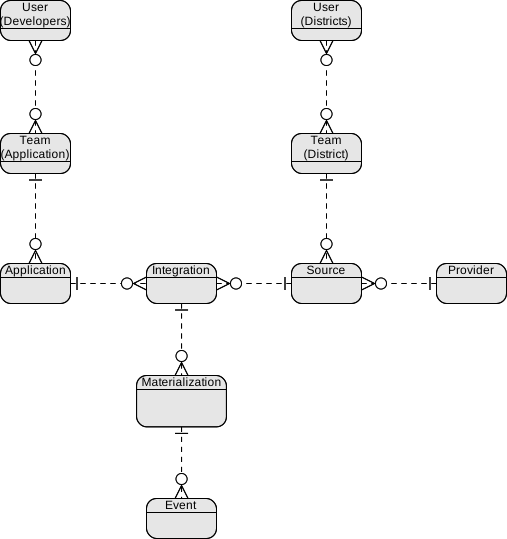
The Meta Data Model describes the infrastructure and relationships within the Edlink platform itself. Unlike the Education Data Model (which describes schools, people, and classes), the Meta Data Model describes who is connecting and how they are connected.
Understanding these four core concepts—Teams, Applications, Sources, and Integrations—is essential for managing your connections programmatically via the Meta API.
Teams
A Team is the top-level container for users and resources in Edlink. There are two distinct types of teams, representing the two sides of the Edlink marketplace:
- Developer Teams: These are the companies building educational software. A Developer Team owns Applications.
- District Teams: These are the schools, universities, or districts that own the data. A District Team owns Sources.
Users (individual accounts) belong to Teams. A user can belong to multiple teams, but a Team is the boundary for billing, permissions, and resource ownership.
Applications
An Application represents your software product within Edlink. It is owned by a Developer Team.
The Application holds the configuration for how your software interacts with the outside world, including:
- Branding: Name, icon, and theme colors shown during login.
- SSO Configuration: Redirect URIs and login settings.
- LTI Settings: Global LTI keys and configuration.
Most developers have at least two applications: one for Production and one for Development/Staging.
Sources
A Source represents a specific instance of a data provider connected by a District Team.
It is important to distinguish between a Provider and a Source:
- Provider: The abstract system type (e.g., Canvas, Google Classroom).
- Source: The concrete connection to a specific instance (e.g., "Springfield ISD Canvas Instance").
A District Team creates a Source when they complete the onboarding process. The Source contains the credentials (API keys, secrets) required to talk to that specific school's data system.
Integrations
An Integration is the connection between one Application and one Source.
This is the most critical object for developers because it represents the active link where data flows.
- Access Tokens: The
access_tokenused for Graph API requests belongs to the Integration. - Permissions: Data sharing rules and scopes are applied at the Integration level.
- Status: An integration can be active, inactive, or disabled.
The Relationship Hierarchy
To visualize how these components fit together:
- A Developer Team creates an Application.
- A District Team creates a Source (by connecting their LMS/SIS).
- When the District authorizes the Application to access the Source, an Integration is created.
[Developer Team]             [District Team]
       |                            |
  Owns [Application] <----> Owns [Source]
             \                    /
              \                  /
               \                /
              Creates [Integration]