
The Public Data API is currently in beta please report any issues and be mindful that it is new!
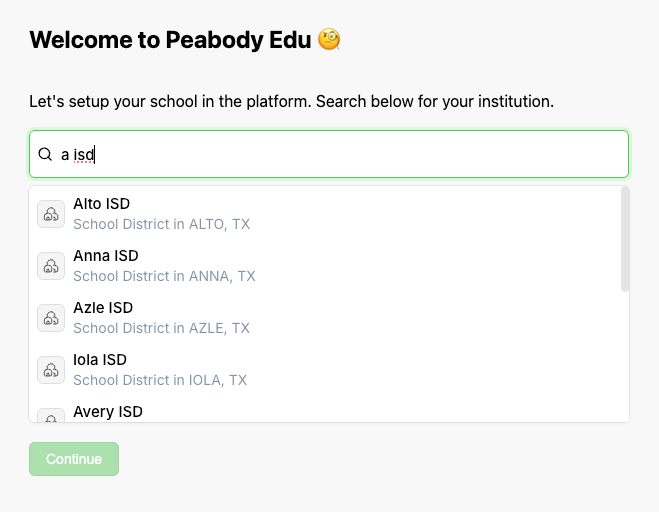
The public data search plugin embeds a search box into your site which allows a user to search for a institution or company via the Edlink Public Data API. They can then select an entity which you can use however you please.
Some examples of use cases are:
- Eliminate duplicate organizations in your system
- Enrich and improve your reporting
- Group freemium users by organization
Edlink ourselves have needed and used this to help schools onboard. It can be easier and quicker to simply search for your school and prevents duplicate signups across that orginization.
Usage
1. Installation
First add the Widgets SDK script to your website. You can do this by adding the following script tag to your website:
<script src="https://ed.link/widgets/edlink@1.0.0.js"></script>
2. Initialization
Then initialize the SDK.
Make sure you provide a publishable key. This is required to use the Public Data API.
You can create a publishable key for your application in the dashboard.
let selected_entity = null;

const edlink = new Edlink({
    client_id: '00000000-0000-0000-0000-000000000000',
    publishable_key: 'pk_...',
    colors: {
        primary: '#52c75b',
        primary_foreground: '#ffffff'
    }
});
Next create a widget instance with a root for the widget to mount to.
const widget = edlink.createWidget({
    root: document.getElementById('edlink-widget-root'),
});
3. Listen for Events
Set up event listeners for user interactions:
widget.on('public.entity.select', (data) => {
    console.log('institution selected: ', data.entity.name);
    selected_entity = data.entity;
});
4. Activation
Activate the plugin like so:
widget.activatePlugin({
    name: 'public_data_search',
    options: {
        type: 'institution',
        max_height_px: 300,
        max_results: 25,
        show_load_more: true
    }
});
The widget will automatically appear because it is attached to a root element. No need to call show().
This widget will resize itself to fit its contents. It will set a fixed height on its iframe but you are welcome to constrain it with the root however you like. We reccomend placing it in an element that is free to resize in the y-axis.
Configuration Options
| Option | Type | Description |
|---|---|---|
type | String | Required. Which type of entity to search for |
max_height_px | Number | Optional. Set a max height and the widget will handle infinite scroll |
max_results | Number | Optional. Set a max items to load per 'page' |
show_load_more | Boolean | Optional. When no max height is set you can hide the load more button |
Events
public.entity.select
Triggered when the user selects an entity
Payload
| Property | Type | Description |
|---|---|---|
entity | Institution | Company | The entity the user selected. Same type as in the configuration options. |