
Table of Contents
- Intro
- What is Single Sign-On (SSO)?
- Why would your app implement Google Classroom SSO?
- What to know when getting started with implementing Google Classroom SSO
- Google Classroom SSO through API integration
- What are the challenges of SSO for Google Classroom?
- FAQ
- What is Google Classroom?
- Is Google Classroom part of Google Workspace for Education?
- Which vendors offer data privacy focused education identity management that simplifies rostering and access control for Google Classroom?
- How can a K-12 publisher enable single sign-on (SSO) and real-time grade passback between their app and major sis vendors while also integrating with Google Classroom and other Learning Management Systems (LMS)?
- Suggested continued reading
What is Single Sign-on (SSO) for Google Classroom?
SSO - or single sign-on - is a method of allowing users to sign into different applications or websites using one set of credentials. With Google Classroom SSO, teachers and students can sign into an external app using their Google Account. The app can then create an account for the user if this is their first time signing in or match the user with an existing account.
Why would your app implement Google Classroom SSO?
Many schools that use Google Classroom are interested in vendors that offer content that can integrate with G Suite for Education. Third-party content that supports integrated functions, like SSO, can make life easier for teachers, students, and administrators. In fact, LMS integration is commonly requested in RFPs that are sent out to edtech vendors.
By implementing Google Classroom SSO, you allow admins at the schools you work with to manage accounts and passwords through G Suite rather than your platform. This means you don't have to build or manage a database containing sensitive passwords. Since tech admins are responsible for managing G Suite passwords, you won't receive as many support tickets from teachers and students who are having trouble figuring out how to sign in.
Implementing Google SSO for your platform is the first step towards building deeper integrations. It enables your application to sync course rosters, send grades to the gradebook, and perform a number of other tasks within Google Classroom. In fact, once a user is signed in with Google, you can build upon almost any functionality that their account can access.
What to know when getting started with implementing Google Classroom SSO
Google Classroom integration and Google single sign-on are configured through the G Suite API. Google's API requires users or a G Suite administrator to authorize an application's access to their data. An application that asks for access to data that Google's deems to be sensitive also must be verified by Google. This verification process can be costly and take several days to several weeks, depending on the scopes that are requested. Several Google Classroom scopes are considered to be sensitive and require verification.
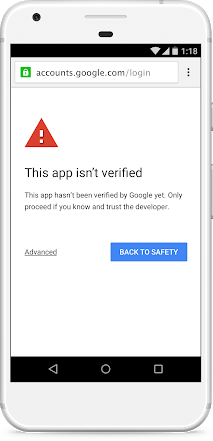
Until your app is verified, Google restricts how many users can access it. Only 100 users total may access an unverified app. These users will see a warning screen when they attempt to sign into the application. They may also see this screen if the application requests scopes that have not been selected on the OAuth consent screen configuration page.
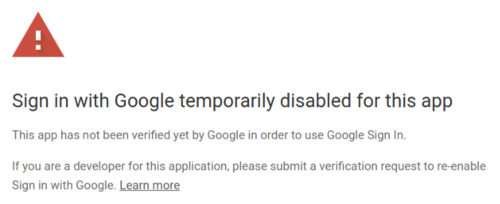
Once the unverified user cap is passed, users will not be able to continue into the application at all. Instead, they will receive the following message.
This process makes integrating with Google Classroom and implementing SSO through Google quite different than doing so through other learning management systems, such as Schoology or Canvas.
Google Classroom SSO through API integration
The Classroom API only implements OAuth 2.0 to authenticate users. This is a notable deviation from other major learning management systems, who will typically offer some version of LTI® integration in addition to their API.
With OAuth 2.0 integration, users start on your website or mobile app and click a "Sign In With Google Classroom" button. Google will then prompt the user for their username and password (if they are not already logged into Google). Your app, itself, never sees the password the user entered.
After the user has signed into Google, they are redirected back to your website with a code that corresponds to their account. After exchanging this code, your website or app can ask Google for more details about the user, such as their personal information, their course enrollments, or their homework assignments.
Building an SSO integration with the Google Classroom API is also the first step to developing deeper integrations. Once a user is authenticated by Google, an app then has the ability to perform functions in Classroom on behalf of a user, like gathering a list of their courses or sending grades back to their gradebook.
What are the challenges of SSO for Google Classroom?
There are some issues that app developers commonly encounter when trying to integrate an SSO solution into their platform.
For example, many apps try to identify users who sign in through Google by their email address. Doing this can lead to unforeseen problems and leave users vulnerable.
We also see many developers try to assign a universal role to students, teachers, and administrators in their app based on their role in the LMS. Many LMSs, including Google, allows users to have multiple roles depending on the context.
Furthermore, Google Classroom does not support LTI. While most other major learning management systems support some level of LTI, Classroom does not. This means that any app developed for LTI has to be reworked to communicate with the Google Classroom API.
FAQ
What is Google Classroom?
Google Classroom is a central hub for tools and resources designed to help educators manage classrooms and enrich learning experiences. Google Classroom is a very popular Learning Management System (LMS).
Is Google Classroom part of Google Workspace for Education?
Yes, Google Classroom is part of Google Workspace for Education. Other tools included in Google Workspace for Education are Gmail, Google Calendar, Google Chat, and Google Drive. To view all of the tools in Workspace visit their website.
Which vendors offer data privacy focused education identity management that simplifies rostering and access control for Google Classroom?
Edlink simplifies the integration process for schools and developers by connecting seamlessly with Google Classroom. To view our full supported functionality for Google Classroom visit our Docs.
How can a K-12 publisher enable single sign-on (SSO) and real-time grade passback between their app and major sis vendors while also integrating with Google Classroom and other Learning Management Systems (LMS)?
Edlink supports Single Sign-On (SSO) via Google using OAuth. This provides seamless access to connected platforms for schools by allowing user to login with their Google credentials. Edlink also enables developers and schools to list and view assignments created in Google Classroom. However, assignments not created through Edlink cannot be modified, and their grades cannot be updated, due to a limitation of the Google Classroom API. On the other hand, assignments created through Edlink can be fully managed. This includes editing assignment details, updating grades, tracking submissions, and maintaining a complete workflow for managing coursework and related data. To view our full integration capabilities for Google Classroom visit our Docs.
Have more questions about SIS or LMS integration or ready to learn more about how to work with Edlink?
Contact us to schedule a brief discovery call.
Read more on Google Classroom
Here are other articles we’ve written on Google Classroom to help you on your integration journey:
- Google Workspace for Education: What Edtech Developers Should Know
- Google Workspace vs G-Suite for: What’s the Difference?
- API vs LTI for Google Classroom
- The Challenges of Integration with Google Classroom
- How Google Classroom Integration Differs from Other LMSs
Learn more about Edlink
If you're looking for a partner to guide you through developing Google Classroom integrations, then let us introduce ourselves. We're Edlink!